Showing posts with label How To. Show all posts

How To: Install RSAT Stuck on “Searching for updates on this computer”

Recently, I had to install Remote Server Administration Tools on a Windows 8.1 Update 1 (32 bit) PC.

So I downloaded Windows8.1-KB2693643-x86.msu and as normally, executed the file to install it.

But  after several minutes, I found the installer had stuck on “Searching for updates on this computer”.


image

How To: Revive a Mobile Phone Clogged With Water

Today, our cell phones are with us 24x7. Mobile phone has become an indispensible part of our lives. But what happens when our constant companion decides to takes a bath and begins loosing its breaths?  

Know your Neta (Electoral Candidate) before Voting…

If you are reading this, the chances are you are an responsible and conscious citizen of India, looking forward to vote and make a difference to the sinking Indian Political System.
Congratulations! You know that your vote counts, you know that you make a difference. So this election,PLEASE DO VOTE. And before voting, please do remember to make an informed choice. Please DO NOT base your vote on cast or religion.   
Now, the important question:  How do I get details of electoral candidate from my constituency?
Answer: Very easy! The Association for Democratic Reforms (ADR) has provided a way to get information about your candidate.
The information that is provided is:
  • Criminal Records (if Any)
  • Assets & Liabilities (Financial Records)
  • Educational Qualifications
To get this information, you have many options: Choose any one, make yourself comfortable!
  1. Go visit www.MyNeta.info
    • You can search for your Candidate by Name / by Constituency Name / by Pin code.
    • You can also subscribe to their news alerts/ subscription list which will keep you updated regarding latest information and facts
  2. Get information using SMS:
    1. Option 1: SMS MYNETA <constituency name> to 9246556070 or 56070
    2. Option 2: SMS MYNETA <pincode> to 9246556070 or 56070

      * SMS charges: Normal SMS charges applicable on 9246556070 and 56070
  3. Toll Free Helpline:
    • Toll-free No.: 1-800-110-440
    • Day/Hours of operation: Mon-Fri (10am – 6pm)
    • Information given: Criminal records, Assets, Liabilities and Education Qualifications.
    • Source of Information: Candidate information given in affidavits.
    • Initially the information based on earlier affidavits only will be provided. New information based on current affidavits will also be provided as and when it becomes available (usually about 7-8 days before the election dates).
  4. Android App (Free):
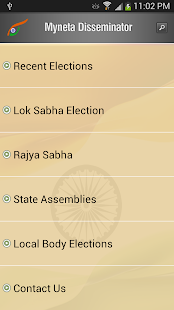
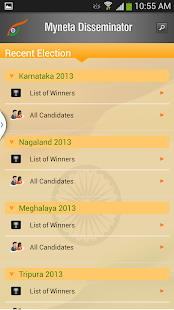
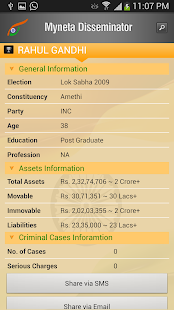
    • Myneta Disseminator: is the android app provided by Webrosoft for MyNeta.info
    • Myneta Disseminator - screenshot thumbnail Myneta Disseminator - screenshot thumbnail Myneta Disseminator - screenshot thumbnail  (Image courtesy : Google Play Store and Original Developer)
  5. ADR-Facebook Initiative (*325*35#) (Free Service):
    • For all those whose mobile operators provide access to facebook using ussd service, you can dial *325*35#
    • (image courtesy: www.MyNeta.info)

In case, you are wandering about the authenticity of the information, read the Disclaimer at the site:
Disclaimer: The primary source for the data used for these reports is the sworn affidavits provided by the candidates themselves. Sheer volume of data that has to be read from the affidavits that are often poorly scanned and the lightening speed at which these reports have to be brought out makes it quite difficult to ensure accuracy of every bit of data. In case of any discrepancy in our reports vis a vis the original affidavit of any candidate, the original affidavit should be considered accurate. If you notice any discrepancies between affidavit and our report kindly let us know and we will fix them on our end as soon as possible.
So now, go ahead, get informed, make a choice, make a difference, use your biggest power in the democracy. Elect your representative. Do vote, do vote for good.
Happy voting!!! 

How to Get Research Papers for Free

If you are a research scholar, a Ph.D, M.Tech or M.Phil student, chance are, you probably are stuck up in finding the research papers.

Most of the reputed institutes do have a subscription to one or the another journal, but many institutes just plain ignore the need of a subscription.
So, where do we look for the research papers and get them for free?

Here are the various options that I have come across while searching for research papers during my research work. No one solution apply for everyone but I am pretty sure any one of these options will certainly be help you out.

  1. Free (Legal) Options:

    1. http//scholar.google.com:  

      You probably know about this. But what you probably could have missed is the option "All 'x' versions" option below the search result. Using this option, you can look for all the copies of the paper at different locations over the web. 
    2. http://highwire.stanford.edu/lists/freeart.dtl:  

      This Stanford university site does list many reputed journals. Some of them are completely free and some have past 12 months of free issues. 
    3. http://openj-gate.org/:  

      This is open access version of J-Gate. I have not personally tried it, but it seems a promising option.
    4. http://www.researchgate.net/:  

      This is a great option of you do have email id on your institute domain. e.g. xyz@institute.com. ResearchGate has a large database of research papers and also a very good platform to publish your research work/draft of research work.  So, if you have an email id of your institute or can arrange one from anyone, go ahead, and grab the opportunity... :)
    5. Ask the author:

      I know this may sound little weird, but this could probably be a very good option as many of the researchers are interested in getting their work ahead, also, it popularizes him/her to be included as the base paper of new researches.
      Tip: Try to contact the last author. He/she is often the Boss: The main researcher.


  2. Free (Illegal) Options:

    1. http://sci-hub.org:

      This is the MOST POWERFUL option. This probably NEVER Fails. This is the grand daddy of piracy in Technical Papers. The servers may some times seem to be down. This is temporary and they are back up very soon. Also, if the servers are down, you can also refer to the next option, which is essentially, an alternative way to sci-hub.org. The way to use it is that you need to enter the url of your paper. The url which on clicking takes you to the page that asks to pay for the paper to download.
    2. http://libgen.org/scimag/:
      This is the alternative way to get into and search the servers of sci-hub.org. There are a few options like “Redirect” which you should probably use carefully.  it redirects you to google scholar search if nothing is found.
    3. http://booksc.org/:
      This is a similar site to sci-hub.org.
    4. http://www.freefullpdf.com/:
      This is a similar site to sci-hub.org.

Finally, always try to use the legal options as, its always better to be on the right side of the law. But may be under certain circumstances, critical to you, you might be forced to use those other options. In any case, go ahead, and start finding your research papers/journal articles. But do always use your conscious.

Happy Researching!!!

Control your PC with your Mobile

Do you want to control your Windows based PC with your Bluetooth Enabled Mobile Phone?
MobileWitch introduces MobileWitch Remote Control.

This is a free software which enables you to control your PC or Laptop with your mobile wirelessly.

The software, currently supports these functionalities:

  1. Mouse Mode : To control mouse movement of your PC
  2. Keyboard Mode : Used to press keys
    1. Up, Down, Left, Right
    2. Space Bar 
    3. Backspace
  3. Application Mode : Used to control
    1. Windows Explorer
    2. Firefox
    3. Windows Media Player
    4. Internet explorer
    5. Winamp
    6. Powerpoint and folders etc.
  4. Utilities : Used for
    1. sending a run command
    2. Sending  a Message to the computer


     mobilewitch-bluetooth-remote-control_02 mobilewitch-bluetooth-remote-control_03

mobilewitch-bluetooth-remote-control_04 mobilewitch-bluetooth-remote-control_05

The MW Remote Control requires two installations.
1. Server Installation on PC which is to be controlled.
2. Client Software for Mobile.

The client software for mobile is J2ME installation and operated on JAVA platform. Means, you can use it, if your mobile supports JAVA and has Bluetooth.mwPC
When you install and start the PC server, it with sit in the Task Area and wait for connection until any mobile client connects to it.
Also, the PC side software requires the JAVA environment for its operation.

Download MobileWitch Remote Control Here


Blogger Labels: Mobile,Windows,Bluetooth,MobileWitch,Remote,Laptop,Mouse,Keyboard,Application,Explorer,Firefox,Media,Player,Internet,Winamp,PowerPoint,Utilities,computer,Server,Installation,Client,Software,JAVA,platform,connection,environment